 Deutsch
 English
 Español
 Français
 Nederlands
Mews Business Intelligence, or Mews BI, provides standardized metric calculations to help you analyze property performance accurately. These metrics ensure consistency across properties and help track key financial indicators. If you run a hostel or a property that sells both dorm beds and private rooms, you can also report on beds as well as rooms.
Use these metrics to:
- Track revenue performance across different sources.
- Analyze occupancy trends to optimize pricing strategies.
- Compare key performance indicators to previous periods.
This article explains how Mews BI calculates key revenue, operational, and occupancy metrics, helping hotels track financial and performance data accurately. To learn more, you can access the help article Using Mews Business Intelligence
In this article, you can learn about the following:
Understanding metric calculations in Mews Business Intelligence
Metrics overview
Note: Revenue metrics (total operating revenue, room revenue, food and beverage revenue, other operated departments revenue, and miscellaneous revenue), as well as payments and taxes, reflect the basis selected in the Net or Gross filter. ADR and RevPAR are calculated from room revenue, so they also change when you switch the filter. The calculation logic for each metric stays the same, only the tax treatment of the underlying amounts changes. For more information, see Switching between Net and Gross revenue figures.
You can find an overview of the metrics used in Mews BI in a table format below:
Metric Category | Metric Name | Definition | Calculation |
|---|---|---|---|
Revenue metrics | Total operating revenue | The sum of all revenue from Room revenue, Food and beverage, Other operated departments, and Miscellaneous revenue. | Room revenue + food and beverage revenue + other operated departments revenue + miscellaneous revenue.
Accounting Category Classification = Room Revenue + Food and Beverage Revenue + Other Operated Departments Revenue + Miscellaneous Revenue |
| Room revenue | Room Revenue includes all income generated from the rental of guestrooms. This encompasses rates from transient guests, group bookings, and contract business. It also includes Other Rooms Revenue such as no-show fees, early departure charges, and day-use room rentals. | Sum of all accommodation-related charges from the Accommodation accounting category classification (customizable by accounting categories, products, etc.)
Accounting Category Classification = Accommodation |
| Food and beverage revenue | Food and beverage (F&B) revenue represents income from the sale of food, beverage, and related services offered in the hotel’s outlets (e.g., restaurants, bars, banquet facilities, in-room dining). | Sum of all food and beverage charges (customizable by accounting categories and products).
Accounting Category Classification = Food & Beverage |
| Other operated departments revenue | Other Operated Departments refer to revenue-generating units within a property that are not part of the core Rooms or Food & Beverage departments but are managed directly by the hotel. These departments provide ancillary services to guests and are typically intended to operate profitably or at least minimize losses. Examples include:
| Sum of all charges classified under events and wellness (customizable by accounting categories).
Accounting Category Classification = Events & Wellness |
| Miscellaneous revenue | Miscellaneous revenue captures non-core, often incidental, revenues that do not belong to Rooms, F&B, or OOD. These include:
| Sum of all miscellaneous income (customizable by accounting categories)
Calculation: Accounting Category Classification = External Revenue, Facilities, Sport, Sundry Income, Technology, Tourism |
| Payments | Tracks payments for financial reporting. | Payments: Total recorded payments from guests Accounting Category Classification = Payments |
| Taxes | Tracks taxes for financial reporting | Accounting Category Classification = Taxes Total tax amounts based on accounting classifications |
Operational metrics | Total rooms | Tracks all physical rooms in your property. | Count of all spaces classified as rooms, suites, or apartments |
| Available rooms | Tracks rooms available for sale. | Total rooms where space status is available |
| Rooms occupied | Tracks how many rooms are occupied. | Total rooms where space status is occupied (customizable by excluding complimentary and house-use rooms) |
| Out-of-order rooms | Tracks rooms temporarily unavailable. | Total rooms where space status is out of order |
| Total in-house guests | Tracks the number of guests currently staying at the property. | Total number of checked-in guests |
| Check-ins and check-outs | Tracks the number of expected guest arrivals and departures. | Check-ins: Total number of reservations with check-in status, Check-outs: Total number of reservations with check-out status |
Occupancy metrics | Occupancy | Measures the percentage of occupied rooms relative to total rooms. | (Rooms occupied / total rooms) × 100 |
| Occupancy excluding out-of-order rooms | Provides a clearer view by removing unavailable rooms. | (Rooms occupied / (total rooms - out-of-order rooms)) × 100 |
| Occupancy excluding complimentary, house use, and out-of-order rooms | Adjusts occupancy by removing rooms not generating revenue. | ((Rooms occupied - complimentary rooms - house use rooms) / total rooms) × 100 |
Revenue per available room (RevPAR) metrics | RevPAR | Measures the revenue generated per available room. | Room revenue / total rooms |
| RevPAR excluding out-of-order rooms | Provides a more accurate revenue estimate by removing unavailable rooms. | Room revenue / (total rooms - out-of-order rooms) |
| RevPAR based on occupancy | Estimates revenue using ADR and occupancy rates. | ADR × occupancy |
Average daily rate (ADR) metrics | ADR | Measures the average revenue per occupied room. | Room revenue / rooms occupied |
| ADR excluding complimentary and house use rooms | Provides a more accurate view by removing non-revenue-generating rooms. | Room revenue / (rooms occupied - complimentary rooms - house use rooms) |
Bed-based metrics for hostels
If your property sells individual beds in shared dorms, room-based metrics do not show how full you are. For example, a 6-bed dorm with 5 beds sold counts as one occupied room. Bed-based metrics count each bed, so the same dorm shows 5 beds sold.
Both numbers are valid. Many hostels track beds sold day to day, while senior management often reports on rooms, as one occupied bed blocks the whole room. To report on beds, a property admin switches Mews BI to the Hostel and hybrid reporting model. You can learn more in the help article Using Mews Business Intelligence for hostels.
In the Hostel and hybrid reporting model, the Space mode filter decides what counts as one unit. With the filter on Bed, the default, the following metrics count beds instead of rooms:
Occupancy: the percentage of available beds that you sold. Calculation: beds sold ÷ available beds × 100.
ADR: the average accommodation revenue for each bed you sell for one night. Calculation: accommodation revenue ÷ beds sold.
RevPAR: the accommodation revenue for each available bed. Calculation: accommodation revenue ÷ available beds.
The other space modes change what counts as one unit:
Room: every room counts as one unit. A dorm counts once, however many of its beds you sell.
Blended: each unit counts as you sell it, i.e., a dorm bed on its own and a private room as a whole.
Accommodation revenue is the same in every space mode, so ADR × occupancy = RevPAR in every space mode. Tile names stay the same in every space mode.
For example, your property has one 6-bed dorm that you sell per bed at EUR 25, and one private double room that you sell as a whole at EUR 80. On one night, you sell 5 dorm beds and the private room, so your accommodation revenue is EUR 205.
| Space mode | Units sold | Occupancy | ADR | RevPAR |
|---|---|---|---|---|
| Bed | 7 of 8 beds, i.e., 5 dorm beds and the 2 beds in the private room | 88% | EUR 29.29 | EUR 25.63 |
| Room | 2 of 2 rooms, i.e., the dorm and the private room | 100% | EUR 102.50 | EUR 102.50 |
| Blended | 6 of 7 units, i.e., 5 dorm beds and the private room | 86% | EUR 34.17 | EUR 29.29 |
Guest-nights, arrivals, length of stay, Pickup, and On the books do not change with the space mode.
The Bed vs. room overview dashboard shows bed and room figures side by side, including RevPAB, i.e., revenue per available bed, TRevPAB, i.e., total revenue per available bed, and your capacity in rooms and beds by space type. It does not have a Space mode filter.
Current limitations of bed-based metrics
The following features are not available yet. Mews plans to add them in a future release.
Dorm fill rate: This metric is not available yet. Use Dorm room occupancy and Beds per room sold on the Bed vs. room overview dashboard instead.
Multiple currencies: Amounts show in the currency of each property. If your properties use different currencies, totals across all of them are not meaningful.
Switching between Net and Gross revenue figures
Mews Business Intelligence lets you display revenue figures on a Net or Gross basis. Use the Net or Gross filter at the top of a dashboard to switch between the two views.
- Net: revenue figures exclude tax. This is the default view.
- Gross: revenue figures include tax, so you see the tax-inclusive amount that hoteliers in gross-reporting markets typically use.
Switching the Net or Gross filter updates revenue, payments, and taxes across a dashboard's charts, tables, and KPIs. ADR and RevPAR also change, as they are calculated from room revenue. Non-monetary metrics, such as occupancy or room counts, do not change.
Dashboards with the Net or Gross filter
The Net or Gross filter is available on the following dashboards, which show revenue figures:
- ADR
- Booking curve and trends
- Channel performance
- Companies & Corporate Business
- Daily summary
- Guest demographics
- Multiproperty
- Multiproperty with budget
- Occupancy
- On the books (beta)
- Pickup
- Reservations
- Revenue
- RevPAR
- RMS forecast
- Tax Intelligence
- Travel agencies
The filter is not available on the following dashboards: Bills and invoices, Blocked rooms overview, Blocked rooms tracker, Budget forecast and history overview, Card payments, Contracting, Guests by age category, and Payments.
Tip: The filter resets to Net each time you open a dashboard. To keep Gross as your default, save it as a personal view from the My views dropdown to the right of the dashboard filters. For more information, see the Key features section in Using Mews Business Intelligence.
Logical Data Model (LDM)
This is a snapshot of the latest logical data model build as of July 3rd 2025.
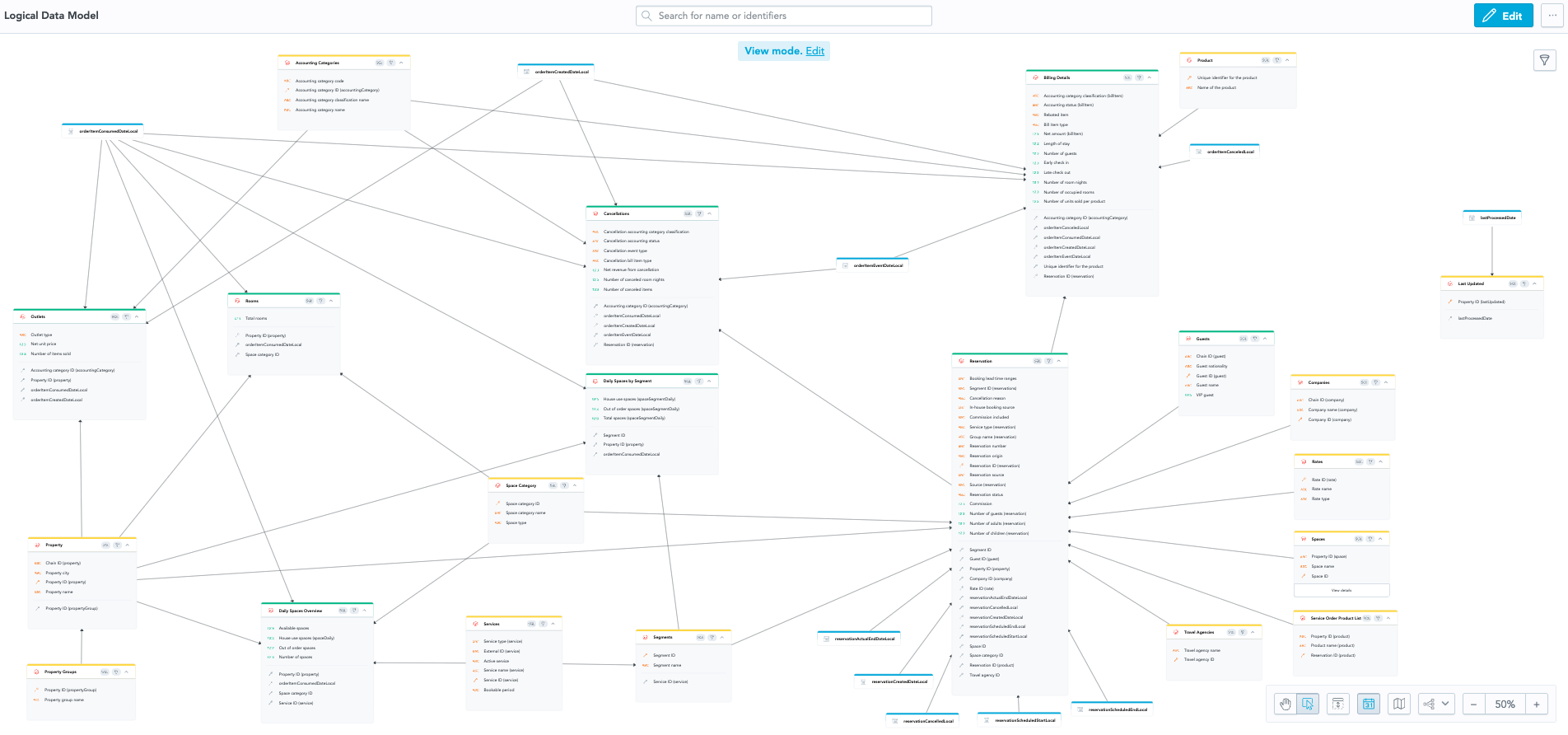
Overview
Table Name | Type | Field Name | Description | Examples |
|---|---|---|---|---|
Accounting Categories | Attribute | Accounting category ID (accountingCategory) | Unique identifier for each accounting category | a245780c-5c1a-4ec6-ab5d-dbdbdbb63392 |
| Attribute | Accounting category name | Name of the accounting category (i.e. room revenue, spa) | Breakfast, Room Revenue, Spa |
| Attribute | Accounting category code | Internal code used to reference the accounting category | 5004, 5003, 5002, 5001 |
| Attribute | Accounting category classification name | Type or classification of the accounting category (i.e. Accommodation, F&B) | FoodAndBeverage, Accommodation |
Billing Details | Attribute | Accounting category classification (billItem) | Accounting category classification for billed item | Accommodation, Events, Facilities |
| Fact | Number of room nights | Total room nights billed | 2 |
| Fact | Number of guests | Number of guests | 1 |
| Fact | Length of stay | Duration of the guest stay | 2 |
| Attribute | Bill item type | Type of billed item | AdditionalExpenseRebate, CityTax, CityTaxDiscount, CustomItem, NightRebate, ProductOrder, ProductOrderRebate, ServiceCharge, SpaceOrder |
| Fact | Net amount (billItem) | Net value of the billed item | 5.00 |
| Attribute | Accounting status (billItem) | Accounting state (i.e. invoiced, pending) | Open, Closed, Inactive, Pending |
| Fact | Number of occupied rooms | Total number of rooms occupied during the period | 100 |
| Fact | Number of units sold per product | Total units sold per product | 100 |
| Attribute | Rebated item | Indicates if the item has a rebate applied | true, false |
| Fact | Early check in | Item indicates if early check in affects occupancy on D-1 | 3 |
| Fact | Late check out | Item indicates if late check outs affects occupancy on D+1 | 2 |
Cancellations | Attribute | Cancellation accounting category classification | Accounting category classification for canceled bill items | Accommodation, Facilities |
| Attribute | Cancellation accounting status | Accounting state of the canceled item | Canceled |
| Fact | Net revenue from cancellation | Total net value of canceled revenue | 50.00 |
| Attribute | Cancellation event type | Billing event type for cancellation | Canceled, Created |
| Attribute | Cancellation bill item type | Type of the item that was canceled | AdditionalExpenseRebate, CancellationFee, CityTax, CityTaxDiscount, CustomItem, Deposit, NightRebate, ProductOrder, ProductOrderRebate, ServiceCharge, SpaceOrder |
| Fact | Number of canceled room nights | Number of room night cancellations | 10 |
| Fact | Number of canceled items | Total units of items canceled | 100 |
Companies | Attribute | Company ID (company) | Unique identifier for a company | bdb0ed52-7842-4c75-8b9c-38f42bc1f4f3 |
| Attribute | Company name (company) | The name of the company | Example Company Name |
| Attribute | Chain ID (company) | Unique identifier for each chain | c0302f6b-2154-413f-88a7-c3098ab5af8c |
Daily Spaces by Segment | Fact | Total spaces (spaceSegmentDaily) | Daily total of spaces per segment | 10 |
| Fact | House use spaces (spaceSegmentDaily) | Daily spaces for internal use per segment | 3 |
| Fact | Out of order spaces (spaceSegmentDaily) | Daily spaces out of order per segment | 2 |
Daily Spaces Overview | Fact | Available spaces (Daily) | Number of available spaces per day | 95 |
| Fact | House use spaces (Daily) | Spaces occupied internally, not available for guests | 1 |
| Fact | Out of order spaces (Daily) | Spaces unavailable due to maintenance or other issues | 4 |
| Fact | Number of spaces (Daily) | Total number of spaces per day | 100 |
Guests | Attribute | Guest ID (guest) | Unique identifier for the guest | e0703c09-de3b-4a5a-9377-cf63d11760f9 |
| Attribute | Chain ID (guest) | Unique identifier to connect guest information with a specific chain | 52b0eed6-8412-40de-a295-7730282e26b9 |
| Attribute | Guest name | Name of the guest | Example Name |
| Attribute | Guest nationality | Nationality of the guest | United Kingdom |
| Fact | VIP guest | Identifies VIP guests | 3 |
Last Updated | Attribute | Property ID (lastUpdated) | Describes when the data was updated | 01h 48m ago |
Outlets | Attribute | Outlet type | Type of outlet (i.e. restaurant, spa) | Restaurant, Spa |
| Fact | Net unit price (outlets) | Price per item, excluding taxes | 10.00 |
| Fact | Number of items sold (outlets) | Number of items sold | 1 |
Product | Attribute | Product ID | Unique identifier for the product | c2c3292c-0404-4c27-b17a-d48de991f422 |
| Attribute | Product name | Name of the product | Example Product Name |
Service Order Product List | Attribute | Product name (product) | Name of the product | Example Name |
| Attribute | Reservation ID (product) | ID linking the product to a reservation | c0fa48c4-6a1c-469b-833c-70f80e2c6d99 |
| Attribute | Property ID (product) | ID linking the product to a property | d54a0ca1-f802-4004-b250-ca1ea8aa627d |
Property | Attribute | Property ID (property) | Unique identifier for each property | d54a0ca1-f802-4004-b250-ca1ea8aa627d |
| Attribute | Property name | Name of the property | Example Property Name |
| Attribute | Chain ID (property) | Unique identifier for each chain | c0302f6b-2154-413f-88a7-c3098ab5af8c |
| Attribute | Property city | City where the properties are located | Sunderland |
Property Groups | Attribute | Property group name | Name of the property group | Example Property Group Name |
| Attribute | Property ID (propertyGroup) | ID of a property to link it to a property group | 6b67bad4-a614-4170-bdb1-95770c7cea37 |
Rates | Attribute | Rate ID (rate) | Unique identifier for a rate | bdac555a-112c-499d-8ecb-60bd307a30cd |
| Attribute | Rate name | Name given to the rate | Example Rate Name |
| Attribute | Rate type | Type of rate (i.e. public, private, availability block, etc.) | Public, Private, Availability Block |
Reservation | Attribute | Reservation number | Unique number assigned to the reservation | 1, 2, 3 |
| Attribute | Reservation ID (reservation) | Unique identifier for a reservation | c0fa48c4-6a1c-469b-833c-70f80e2c6d99 |
| Attribute | Reservation status | Current status of the reservation | Canceled, Confirmed, Inquired, Optional, Processed, Started |
| Attribute | Reservation source | Source of the reservation (i.e. Booking, HotelBeds, in-house...) | Booking, HotelBeds, in-house |
| Attribute | Reservation origin | Origin of the booking (i.e. direct, OTA) | Direct, OTA |
| Attribute | Segment ID (reservations) | ID linking a segment to a reservation | de977df5-40f1-4279-9905-f8161510a54b |
| Fact | Number of guests (reservation) | Number of guests in a reservation | 3 |
| Fact | Number of adults (reservation) | Number of adults in a reservation | 2 |
| Fact | Number of children (reservation) | Number of children in a reservation | 1 |
| Attribute | Group name (reservation) |
| Surname-123 |
| Attribute | Source (reservation) | Origin channel or source of the reservation | Call center, Channel, Email, In person, Message, Telephone, Website |
| Attribute | Cancellation reason | Reason provided for canceled reservation (i.e. no show, requested by guest) | No show, Requested by guest |
| Attribute | Booking lead time ranges | Ranges of days to show pickup period | 0, 1-3, 4-7, 8-14, 15-30, 31-60, 61-90, 90+, Unknown |
| Attribute | Commission included | Commission is included in the pricing | true, false |
| Fact | Commission | Percentage of commission | 1.00 |
| Attribute | Service type (reservation) | Type of service in a reservation (i.e. bookable or additional) | Additional, Bookable |
| Attribute | In-house booking source | Source of bookings created by an employee in the Mews platform (i.e. phone, email, call center, etc.) | Phone, Email, Call Center |
Rooms | Fact | Total rooms | Total number of rooms at the property | 50 |
Segments | Attribute | Segment ID | Unique identifier for each segment | de977df5-40f1-4279-9905-f8161510a54b |
| Attribute | Segment name | Name of the segment (i.e. family, business traveller) | Family, Business Traveler |
Services | Attribute | Service ID (service) | Unique identifier for the service | 46d1fc18-21e7-4f48-945d-b0f409486d9f |
| Attribute | Service name (service) | Name of the service | Example Service Name |
| Attribute | Service type (service) | Type of service (bookable or additional) | Additional, Bookable |
| Attribute | External ID (service) | External reference identifier for API purposes | bae1aa19-2f80-4f46-93a0-746f8d068da3 |
| Attribute | Active service | Indicates that the service can be booked | true, false |
| Attribute | Bookable period | Bookable time period of a service (i.e. nightly, hourly) | Day, Night, Month |
Spaces | Attribute | Space ID | Unique identifier for the space | 143a670c-9420-4df0-bfa9-5821a59acccf |
| Attribute | Property ID (space) | ID of the property the space belongs to | 6b67bad4-a614-4170-bdb1-95770c7cea37 |
| Attribute | Space name | Name of the space | Example Space Name |
Space Category | Attribute | Space category ID | Unique identifier for space category | 4e35765b-01d6-459f-a782-24db8fc76dbd |
| Attribute | Space category name | Name of the space category (i.e. Room 101) | Room 101 |
| Attribute | Space type | Name of the space type (i.e. room, bed, parking spot) | Room, Bed, Parking Spot |
Travel Agencies | Attribute | Travel agency ID | Unique identifier of the travel agency | fedbd77f-4fdf-4643-8b35-0f89306d9fa4 |
| Attribute | Travel agency name | Name of the travel agency | Example Travel Agency Name |
Help article